
- Platform
- Windows
- Stable URL
- https://dl.roslegacy.net/full
- Resolved host
- edge.roslegacy.net
- Filename
- ROSLegacy_Install_202609251811.zip
- File size
- 8,251,115,387 bytes (about 7.68 GiB)
- Status
- live
PC client
Download the ROS Legacy Windows client
Evidence console
Official install hosts
Platform
- Platform
- Android
- Stable URL
- https://dl.roslegacy.net/android/apk
- Resolved host
- cdn.mobile.roslegacy.net
- Filename
- RoS-Legacy-2026091811.apk
- File size
- 108,574,372 bytes (about 103.5 MiB)
- Status
- live
- Platform
- iOS
- Stable URL
- iOS — Coming Soon
- Resolved host
- —
- Filename
- —
- File size
- —
- Status
- coming-soon
DO NOT USE GOOGLE DRIVE OR THIRD-PARTY APK MIRRORS for downloads.

Download the ROS Legacy Windows client from dl.roslegacy.net/full and nowhere else. That URL is the Download for PC control on roslegacy.net. The endpoint redirected to edge.roslegacy.net and served ROSLegacy_Install_202609251811.zip at 8,251,115,387 bytes (about 7.68 GiB). There is no Steam depot. Filter the console to Windows, read the filename and size, then refuse any Google Drive, Mega, or MediaFire copy of the same zip. After setup, the client still asks for the Mirae email or username from mirae-labs.com/login, not a Steam account.
What the Windows zip actually is
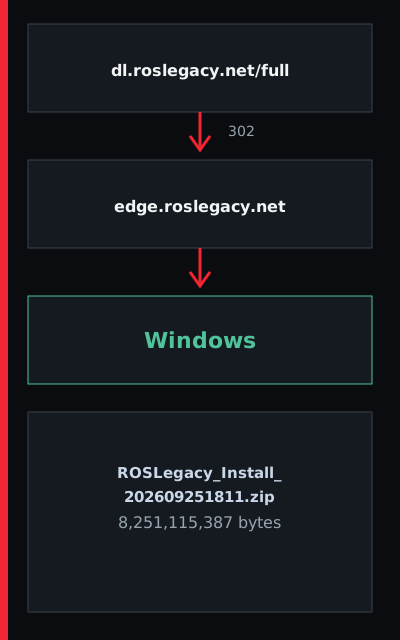
- The stable entry is https://dl.roslegacy.net/full. After the 302, the file lands on edge.roslegacy.net with the name ROSLegacy_Install_202609251811.zip. The measured length is 8,251,115,387 bytes. If a friend sends a smaller zip with a similar name, it is not this build. If a page asks you to sign into a cloud drive to fetch ROSLegacy_Install, close it and return to dl.roslegacy.net.
- You still need a Mirae Labs ID before you queue. Create it at mirae-labs.com/register and sign in at mirae-labs.com/login. The installer does not create that ID for you. Android players should leave this page and use the Android desk so they do not run a Windows zip on a phone.
- The Download for PC label on roslegacy.net is the same URL as the console. Bookmark dl.roslegacy.net/full, not a search ad. After the 302, the CDN name should read edge.roslegacy.net. A zip that skips that hop and arrives from an unknown bucket is not this build.
- A zip that never touches edge.roslegacy.net is not this Open Beta client.
Install steps on Windows
- Use a browser on the PC that will play. Open dl.roslegacy.net/full and wait for the zip to finish — 7.68 GiB is a long transfer on a slow line. Check that the downloaded name matches ROSLegacy_Install_202609251811.zip and that the size is in the 8.25 billion byte range. Extract the archive with the OS zipper or 7-Zip, then run the setup the archive contains.
- Allow the installer through Windows Defender if the OS prompts, but only after the host and filename match. Do not disable SmartScreen for a file that came from a random Telegram channel. After setup, launch the client and sign in with the Mirae email or username. If the client asks for another download host, stop and compare it to the console on this page.
- Pause other large downloads so the 7.68 GiB transfer can finish in one piece. If the browser splits the file or a download manager renames it, compare the final byte count to 8,251,115,387. Extract, then run setup from the unpacked folder. Sign in with the Mirae email or username only after the client window exists.
- Finish the transfer in one piece, then extract before you run setup.
Disk space and missing spec sheets
- Mirae Labs has not published CPU, GPU, or RAM minimums. The only hard number on the PC side is the installer size: 8,251,115,387 bytes. Leave extra free space beyond that zip for extraction and the unpacked client. If a hardware list appears on a fan screenshot, treat it as unofficial until roslegacy.net prints it.
- The file-size desk repeats the measured bytes for Windows and Android without inventing a GPU line. Use it when you need the numbers without the install narrative.
- A 256 GB laptop with 10 GB free may download the zip and still fail extraction. Clear space first. The operator has not listed SSD versus HDD, so any drive that can hold the zip plus unpack plus client is the practical test. GPU names from other wikis are not copied here. Leave the extra gigabytes free before you click extract.
- Clear space first so the unpack does not fail after a long download.
How to reject a fake Windows pack
- A real PC file starts at dl.roslegacy.net and lands on edge.roslegacy.net. The retired Myth Games path https://dl.mythgames.net/rosl/full returns 404, so an old bookmark there is dead. A page titled ROS Origin or ROS Reborn is a different operator — do not install those clients thinking they are this Open Beta.
- Read the safe-file desk before you recover a failed download from a mirror. If you already ran a drive zip, remove it, change the Mirae password at reset-password, and take the official file again.
- Cloud-drive zips, Mega folders, and MediaFire mirrors are outside the allow-list even when a Discord pin says they are faster. The retired Myth Games URL 404s, so it cannot be a backup. If you already ran a stranger zip, remove it, rotate the Mirae password, and take dl.roslegacy.net/full again.
- Rotate the Mirae password if you already ran a stranger zip, then take dl.roslegacy.net/full again.
- Cloud folders, Mega links, and MediaFire copies sit outside the allow-list even when a pin in chat says they are faster.